Awakening financial Group

Get Contracted Checklist

Step 1: Get Plugged In

If you haven’t already, connect with the Awakening Team

Done with Step 1?


Have Questions?

If you have any questions going through any of these steps, reach out to [email protected]
Step 2: Schedule a Contracting call with Kate

Send an email to [email protected] and let Kate know that you’re ready to start contracting

Before the call

Make sure you have the following

  • Active license and National Producer Number (NPN): If you need to look up your NPN, you can use the link below
  • E&O insurance: This is an insurance plan which protects you. The carriers won’t appoint you unless you’re covered. You can sign up through NAPA. Select option B.
  • Voided check: You need this so you can get paid by the carriers. They won’t appoint you if you don’t upload this. If you don’t have checks, you can also upload a note from your bank. It needs to be on bank stationary, list your account and routing numbers, and be signed by a bank representative.
  • Documents: If you think something will come up in your background or credit checks, you’ll need to upload a letter of explanation and any relevant court documents.
  • Letter of Release: If you were previously appointed under another company, you’ll need a letter or release from them so you can get appointed through us.
Look up NPN Get E&O

Make sure your information is correct in NIPR

Our system runs a check against the national database (NIPR) to verify that you’re a licensed agent. If your information in our system doesn’t match what’s in NIPR, it can cause errors. To prevent any issues, before we add you into our contracting systems, double check that your information is correct in NIPR:

  • Date of Birth
  • Email Address
  • Phone Number
  • Address

You can login to NIPR using the link below or click on the “learn more” button for more instructions. Once you know that your information is correct, you can start onboarding.

Go To NIPR Learn More about NIPR check

Done with Step 2?


Have Questions?

If you have any questions going through any of these steps, reach out to [email protected]
Step 3: Onboard In HCMS and NLC

We have a few systems that we use for contracting: HCMS, NLC, and SureLC. We need to get you set up in HCMS first. After you set up your HCMS account, you’ll be prompted to set up your NLC account too.

Onboard in HCMS

If you have not received an email from HCMS, [email protected] to let Kate know you need an invitation to HCMS.

Once we send that invitation, you’ll receive a few emails from HCMS. Make sure to check your spam folder if you don’t see them.

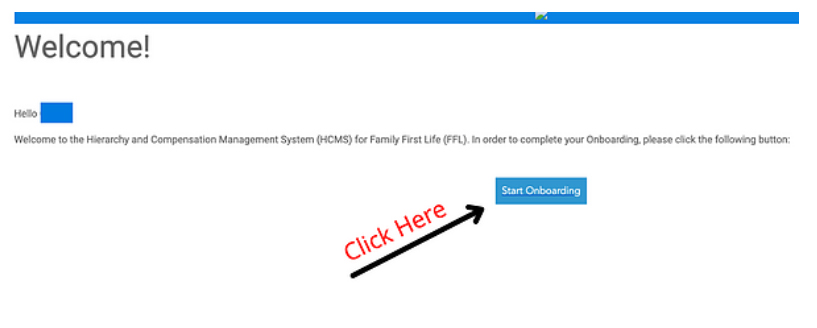
First Email

The first email will prompt you to review and edit personal info and create a password to complete your HCMS profile. This email will come from [email protected] When you complete that step, it will trigger the second email.

Image: The first email from HCMS

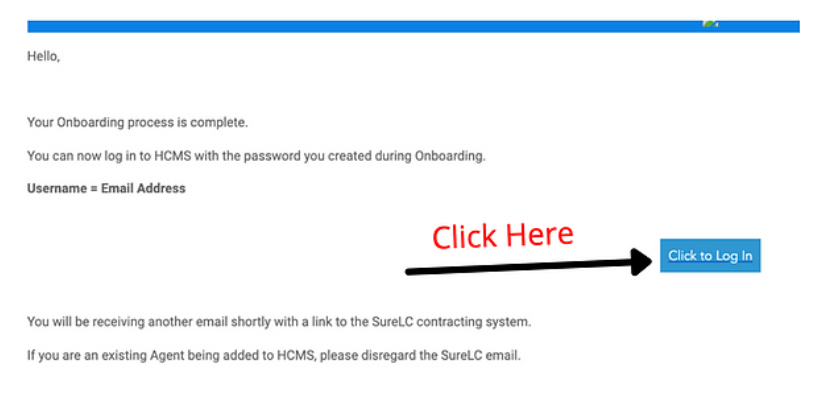
Second Email

The second email will prompt you to create your HCMS login. This email will also come from [email protected] When you complete that step, it will trigger the third email.

Email 2

Image: The second email from HCMS

Third Email

The third email will send you a link to SureLC which you’ll need for the next contracting step. 

Complete NPN Verification

In order to finish onboarding in our systems, you’ll be prompted to verify your National Producer Number (NPN). If you don’t know what it is, you can look it up with the link below. 

NPN Verification
Look up NPN

Onboard in NLC

When you’re prompted, you’ll need to set up your account in NLC and fill out your profile.

What about the AML training? You may be asked to upload an anti-money laundering (AML) training. You won’t have this done yet but will need to upload a training later. In the next step you’ll take an AML training in SureLC. Once that’s complete, You’ll need to upload the certificate from that training back in here.

Done with Step 3?


Have Questions?

If you have any questions going through any of these steps, reach out to [email protected]

Step 4: Onboard in SureLC (Awakening x FFL Carriers)

It is important to have all of your information correct or else there can be delays and errors with your contracting

Before You Start

You need to be on a computer (not your cell phone) when you’re working in SureLC

Create An Account

Follow the link below to register your account.

SureLC

If you were previously contracted with another IMO on SureLC (Surancebay), you must use a NEW email or it will not come to our team.

*Select New User and Create an Account*

For the Upline field, put the name of the agent who brought you on. Your upline’s name is in the Step 3 email that contained the link for this page.

SureLC setup

Image: Create an account in SureLC. Make sure your email is correct.

Fill out Appropriate Fileds

On the left hand side you will see 11 Tabs. Below are some hints to help with each:

  • My Profile – Fill in your info
  • Doing Business As – Select individual and no to the next two questions
  • Bank Info – Fill out your info (need a voided check – click here if needed)
  • Licenses – Should auto populate (if you just got licensed this may take a few days)
  • FINRA– If you do not know what this is, select NO
  • Questions – fill out and answer appropriately
  • History – Leave blank
  • Training – ONLY NEED AML. Multiple carriers will have your complete their own AML trainings. LIMRA will also be taken care of at a later date. For now, click on “add training” and complete the free SureLC training.
  • E/O – you will need to purchase if you do not have, we use NAPA (see step 2)
  • Signature – Complete your agent profile and electronic signature (here is a helpful guide for completing signatures Producer Signatures)
  • Profile Documents – be sure all are uploaded (there is a drop down labeled “filter by type” which shows everything needed – archive any duplicates that populate by clicking the 3 dots next to the document )

Verify Your Information

Make sure there are no red or yellow dots next to any section

Done with Step 4?


Have Questions?

If you have any questions going through any of these steps, reach out to [email protected]

Step 5: Submit Contracting Requests In NLC

Americo, American Amicable, Mutual of Omaha, Corebridge, Transamerica, Ethos

Now that you’ve onboarded in HCMS, NLC, and SureLC; you’re ready to start submitting contracting requests

Log Back Into NLC

Login To NLC

Submit COntracting Requests In NLC

Put in new contracting requests for:

  • Americo
  • American Amicable (for most states) and / or Occidental (if you’re licensed in IA, MA, MI, NJ, RI, or VT)
  • Mutual of Omaha
  • Corebridge (AIG)
  • Transamerica
  • Ethos

Done with step 5?


Have Questions?

If you have any questions going through any of these steps, reach out to [email protected]

Step 6: Submit Contracting Requests In SureLC
(Awakening cArriers)

SBLI, Banner, F&G, North American, and UHL

Important Note

You will need to set up a second SureLC account using the link below. You cannot request these carriers through the other SureLC account you created earlier and you’ll need to use a different email address.

Create Second SureLC Account

Fill out Profile in SureLC

Make sure to fill out each of the sections and that they are no red or yellow dots.

Submit COntracting Requests In SureLC

Put in requests for:

  • SBLI
  • Banner
  • F&G
  • North American

Note: Once you start a request, email [email protected] to let us know so we can fill out the hierarchy section and send it off to the carrier 

Request to get contracted with UHL

To get contracted with UHL, email to [email protected]

Done with step 6?


Have Questions?

If you have any questions going through any of these steps, reach out to [email protected]

Step 7: Follow Up with the Carriers

Appointing with the carriers will take 5-10 business days. However, once you have a few appointments, you can get on the phones.

How To Follow up with the carriers

Once you’re approved by the carrier they will send you a welcome email with a  writing number. If you have any questions about your contracting once the request has been sent out or if you don’t receive an email you can reach out directly to the carriers directly using the link below.

Carrier Phone Numbers

Done with step 7?


Have Questions?

If you have any questions going through any of these steps, reach out to [email protected]

Step 8: Get In the Field

Once you request all of your carrier contracts, you can move on to the active agent checklist

Active agent checklist

Done with step 8?


Have Questions?

If you have any questions going through any of these steps, reach out to [email protected]